End-to-end use cases
Use case: Migrating Alteryx workflows
This is the full story of how a Polkomtel analyst's hand-built Alteryx workflow — a chain of colourful tool boxes that has lived on one person's laptop for years — becomes a governed, cloud-based DataFlow AI pipeline. We follow every screen and every decision, explained so that someone who has never written a line of code can follow along.
Meet the people and the problem
Let us introduce Joanna. Joanna works in marketing analytics at Polkomtel Plus. She is not a software engineer; she is an analyst who needs to combine data from spreadsheets and databases to answer business questions. For years her favourite tool has been Alteryx Designer — a program where you build a data process by dragging little coloured tool icons onto a canvas and joining them with lines. No code, just boxes and arrows.
Alteryx is wonderful for one person experimenting at their desk. But it has grown into a quiet problem for Polkomtel:
- Each workflow is a
.yxmdfile that lives on an analyst's laptop or a shared drive. There is no central repository, no version control, no lineage — no record of who changed what, or where the data came from. - The workflows are not promotable to production. They run when Joanna opens Alteryx and clicks Run. If Joanna is on holiday, the report does not happen.
- Polkomtel pays around $200,000 a year for Alteryx licences, on top of the much larger Informatica bill.
Polkomtel has 50 to 100 Alteryx workflows like Joanna's, and wants them all moved onto DataFlow AI — the same modern, governed, cloud platform the Informatica workflows are migrating to. There they become scheduled, versioned, monitored pipelines that run on their own. The Migration Center inside DataFlow AI does most of that conversion automatically.
In plain terms
A "migration" simply means moving something to a new home. We are moving the instructions — Joanna's chain of tool boxes — from Alteryx into DataFlow AI. The spreadsheets and databases the workflow reads and writes do not move; only the tool that drives the process changes.
What an Alteryx workflow actually is
Before Joanna can move a workflow, it helps to know what one is built from. An Alteryx workflow is far flatter and simpler than an Informatica one — there are no nested sessions or mappings, just a single canvas.
| Alteryx term | Everyday analogy | What it really is |
|---|---|---|
Workflow (.yxmd file) | One assembly line drawn on paper | The whole process — a set of tools wired together |
| Tool | One station on the assembly line | A single processing step — read a file, filter rows, do a calculation, join, summarise |
| Tool ID | The station's number badge | A unique number Alteryx gives every tool so connections know what links to what |
| Configuration | The dials and settings on that station | The tool-specific settings — which column to filter on, what formula to apply |
| Annotation | A sticky note on the station | The friendly label the analyst typed for the tool |
| Connection | The conveyor belt between two stations | A line carrying data from one tool's output to the next tool's input |
Macro (.yxmc file) | A pre-packaged mini-machine bolted into the line | A reusable sub-workflow saved as a separate file and dropped into bigger workflows |
So an Alteryx workflow is just a flat set of tools joined by connections. A .yxmd file is actually XML underneath — structured text the Migration Center can read. DataFlow AI uses the same idea but calls the tools nodes and the connections edges, assembled into a pipeline.
Inside the .yxmd, the Migration Center expects this shape:
AlteryxDocument
 ├─ Properties → MetaInfo → Name        (the workflow name, optional)
 ├─ Nodes
 │   └─ Node  (each has a ToolID)
 │        ├─ GuiSettings  (Plugin="…Filter.Filter" — tells us the tool type)
 │        └─ Properties
 │             ├─ Configuration         (the tool's settings)
 │             └─ Annotation → Name      (the friendly label)
 └─ Connections
      └─ Connection → Origin / Destination
The Migration Center works out what kind of tool each node is by reading its Plugin attribute and taking the last word: AlteryxBasePluginsGui.Filter.Filter simply means a Filter tool.
The example we will follow: EksportujDoBazyWsparcia.yxmd
Joanna's first migration is a real Polkomtel workflow: EksportujDoBazyWsparcia.yxmd, built in Alteryx 2022.3. The name means roughly "export to the support database."
In plain words, this workflow handles courier and logistics (the "BDL" shipment data). It reads from an Excel spreadsheet and a Teradata database, runs the data through about 50 tools arranged in 4 parallel streams, removes duplicates across the different sources, routes rows depending on the environment, and writes the results out to MSSQL and Teradata.
It is rated Medium-High complexity, and the Migration Center expects roughly 78%–82% automatic conversion. The remaining 18%-or-so is mostly custom macros — .yxmc files like CountRecords.yxmc, Log_BDL_LH.yxmc, and IdImportu.yxmc — plus one stored procedure. We will see exactly how those get handled.
Step 1 — Locate and prepare the .yxmd file
Joanna does not need to "export" anything — the .yxmd file is the workflow. She simply finds EksportujDoBazyWsparcia.yxmd on the shared drive where it lives.
Two practical points:
- The file must end in
.yxmd— that is how the Migration Center recognises an Alteryx workflow. (Alteryx macros are saved as.yxmcfiles; those cannot be uploaded directly and are handled differently — see Step 7.) - The file must be 50 MB or smaller. Workflow definitions are small text files, so this is rarely a concern.
If the workflow relies on environment-parameterising macros — small macros that just feed in things like a database name or a date — Polkomtel's plan is to exclude those from the automatic migration and handle the parameters natively in DataFlow AI instead.
In plain terms
Joanna is not changing her Alteryx workflow at all. She is handing the Migration Center a copy of the blueprint. The original .yxmd keeps working on her laptop, exactly as before, until the new pipeline has been proven trustworthy.
Step 2 — Upload the file to the Migration Center
Joanna's engineering colleague Marek does the upload (creating pipelines needs the Data Engineer role). He logs in to DataFlow AI at https://dataflow.polkomtel.internal with his normal Polkomtel single sign-on, clicks Migration in the left sidebar, and lands on the Import Wizard.
He drags EksportujDoBazyWsparcia.yxmd onto the drop zone. The Migration Center immediately runs a few safety checks:
- Is the filename present and the extension allowed? It must be
.xml,.yxmd, or.dtsx..yxmdis on the list, so the file passes. - Is the file under 50 MB? Yes.
- It creates a tracked migration job, marks it
UPLOADED, saves the raw file securely, and writes the job record to disk so nothing is lost.
From this one upload the Migration Center runs the entire conversion pipeline automatically. Marek just watches the job status change through these stages:
UPLOADED → PARSING → PARSED → CONVERTING → VALIDATING → VALIDATED
         → COMPLETED  |  COMPLETED_WITH_WARNINGS  |  FAILED
The next sections explain what each stage does.
Step 3 — Parsing: reading the canvas into a common language
The job status changes to PARSING. The Migration Center picks the Alteryx Parser and reads the .yxmd file.
The parser walks every Node in the file and sorts each tool into one of three buckets:
- Input tools (such as
AlteryxInput,DbFileInput,FileInput) become sources — they pull in the file path, connection, and table. - Output tools (such as
AlteryxOutput,DbFileOutput,FileOutput) become targets. - Everything else becomes a transformation — a processing step.
For each tool it also reads the right details depending on the tool's type:
- A Formula tool's calculation rows (each: field, expression, type).
- A Summarize tool's summary rows (each: field, action).
- A Filter tool's keep-condition text.
- A Select tool's chosen fields.
Finally it reads every Connection and records it as an edge — an arrow — linking the right tools by their Tool ID.
The result is a tool-neutral internal description of the workflow. This is the clever part: PowerCenter, Alteryx, SSIS, and DataStage all get translated into the same internal shape, so DataFlow AI only needs one conversion engine afterwards.
If the .yxmd is malformed, the job stops here as FAILED with a clear message. For Joanna's valid file, parsing succeeds and the status becomes PARSED.
In plain terms
Parsing is like someone carefully reading Joanna's hand-drawn assembly-line diagram and re-drawing it onto a clean, standard template. The process has not changed — only the way it is written down.
Step 4 — Converting: turning each Alteryx tool into a DataFlow node
The job status changes to CONVERTING, and the Rule Engine now produces the equivalent DataFlow AI pipeline. It tries three layers, in order:
- A precise rule. Most common Alteryx tools have a dedicated, hand-written conversion. These are predictable and trustworthy — the node is labelled with the conversion source
rule_engine. - A generic mapping. Some tools get the correct DataFlow type but, if their confidence is high enough, are carried across with a generic configuration rather than a full translation.
- The AI assistant (LLM). Only genuinely unusual tools — confidence below 0.60 — are handed to an actual AI model (Anthropic's Claude). Those nodes are labelled
llm.
That label tells the reviewer instantly how each node was produced.
The tool-by-tool mapping table
Here is the heart of the conversion — how each Alteryx tool becomes a DataFlow node. Almost every conversion turns a visual tool into a piece of SQL, the standard language databases speak, which is what makes the result fast and cloud-ready.
| Alteryx tool | What it does, in plain words | Becomes (DataFlow node type) | Confidence | What gets built |
|---|---|---|---|---|
Input Data (AlteryxInput, DbFileInput, FileInput) | Reads data in from a file or database | source | 0.90 | A source definition with the file, connection, and table |
Output Data (AlteryxOutput, DbFileOutput, FileOutput) | Writes the finished data out | sink | 0.90 | A target definition |
| Select | Keeps, drops, or renames columns | column_select | 0.95 | The list of kept fields |
| Filter | Drops rows that fail a condition | sql_where | 0.95 | The condition becomes a SQL WHERE clause |
| Formula | Calculates new columns | sql_expression | 0.80 | A field-to-expression map, translated to SQL |
| Summarize | Totals, counts, averages per group | sql_group_by | 0.90 | "Group By" fields become GROUP BY; the rest become aggregates |
| Join | Combines two streams into one | sql_join | 0.90 | The join type (default INNER) and the join fields |
| Union | Stacks several streams into one | sql_union_all | 0.95 | A UNION ALL with the union mode |
| Sort | Puts rows in order | sql_order_by | 0.98 | A SQL ORDER BY on the chosen fields |
| Sample | Keeps only the first N rows | sql_limit | 0.85 | Generic config |
| Unique | Removes duplicate rows | sql_distinct | 0.90 | Generic config |
| CrossTab | Turns tall data into a wide table | sql_pivot | 0.75 | Generic config |
| Transpose | Turns a wide table into tall data | sql_unpivot | 0.75 | Generic config |
| RegEx | Pattern-matches and extracts from text | regex_transform | 0.70 | Generic config |
| DateTime | Reformats and parses dates | datetime_transform | 0.85 | Generic config |
| Multi-Field Formula | Applies one formula across many columns | multi_field_expression | 0.75 | Generic config |
| Multi-Row Formula | A formula that looks at the row above/below | window_function | 0.65 | Generic config — review recommended |
| Find Replace | Looks up and substitutes values | string_replace | 0.80 | Generic config |
| Text To Columns | Splits one text column into several | split_column | 0.80 | Generic config |
| Generate Rows | Creates rows out of nothing (e.g. a date series) | row_generator | 0.70 | Generic config |
| Macro | A reusable sub-workflow (.yxmc) | custom_transform | 0.40 | Below 0.60 — handed to the AI assistant |
| Python Tool | Custom Python code | custom_transform | 0.35 | Handed to the AI assistant |
| R Script | Custom R statistical code | custom_transform | 0.30 | Handed to the AI assistant |
| Run Command | Runs an external program | custom_transform | 0.30 | Handed to the AI assistant |
In plain terms
The high-confidence tools at the top of the table — Input, Select, Filter, Formula, Join, Summarize, Sort, Union, Output — are the everyday "bread and butter" of any Alteryx workflow. These convert by trusted rule, with no fuss. It is only the special tools — macros, Python, R — that need a human's attention.
What converts automatically vs. what needs review
For EksportujDoBazyWsparcia.yxmd, the picture looks like this:
Converts automatically (the ~80%) — the four parallel streams are built mostly from Input, Select, Filter, Formula, Join, Summarize, Sort, and Union tools. Every one of these has a precise rule, converts as rule_engine, and scores 0.80 or above. The Excel and Teradata inputs become source nodes; the MSSQL and Teradata outputs become sink nodes (both at a fixed 0.95 confidence).
Needs a human (the ~20%) — the workflow uses custom macros that must be inspected and rewritten by hand, because a macro's logic lives inside its own .yxmc file, which the engine cannot see from the .yxmd alone:
- Six copies of
CountRecords.yxmc— a row-counting macro. - Six copies of
Log_BDL_LH.yxmc— a logging macro. - One copy of
IdImportu.yxmc— an import-ID macro. - One
plkPrzesylki_Aktualizacja_BDLstored procedure that runs as a Post-SQL step on a database.
Each macro tool is converted to a custom_transform placeholder at confidence 0.40 and routed to the AI assistant, which produces a starting skeleton. But a human must open the original .yxmc files, understand what they do, and finish the conversion properly.
Watch out
A custom .yxmc macro cannot be migrated by reading the workflow alone — its real logic is inside the macro's own file. The Migration Center is honest about this: it marks every macro node as custom_transform, scores it low, and flags it for manual work rather than guessing. Any node typed custom_transform automatically blocks an unattended release.
Step 5 — Confidence scoring and the 0.85 release gate
Every converted node gets a confidence score between 0 and 1 — the engine's honest estimate of how sure it is. A Sort scores 0.98; a Macro scores 0.40. The overall confidence is the average of all node scores.
Confidence controls whether the migration may finish on its own. This is the release gate, set at 0.85. After conversion, the Migration Center collects a list of blocking issues. The job is blocked if any of these is true:
- The overall confidence is below 0.85.
- Any single object converted below 0.80 confidence.
- Any object is typed
custom_transform, or carries unresolvedissues. - Validation found a problem.
If the blocking list is empty, the job is marked COMPLETED. If it has even one entry, the job is marked FAILED — and the error message names exactly which gate tripped.
For EksportujDoBazyWsparcia.yxmd, the seven-plus macro nodes are all custom_transform. That alone blocks an unattended release, so this job is FAILED by the gate. That is not a problem — it is the system working correctly. It means "an engineer must finish the macro work before this ships." Marek expects this for a Medium-High workflow; only the simplest workflows sail straight through to COMPLETED.
| Outcome bucket | What it means for the engineer |
|---|---|
| Fully Automatic (~58% of all workflows) | Converted and ready — under 30 minutes of review |
| AI-Assisted (~27%) | The AI generated it; review and approve — 2–4 hours |
| Manual Work (~12%) | Custom logic, macros, plugins — hands-on, 1–3 days |
| Not Supported (~3%) | No migration path; must be redesigned |
Alteryx workflows as a group convert in the 75%–82% range. EksportujDoBazyWsparcia.yxmd lands at 78–82% automatic, with roughly one day of manual work for the macros and stored procedure.
In plain terms
Think of the gate like airport security for your data pipeline. The straightforward bags go straight through. Anything unusual — the macros here — is set aside for a human to open and check. The Migration Center would rather pause and ask than wave through something it does not fully understand.
Step 6 — Validation: six independent safety checks
While the job was VALIDATING, two layers of checks ran.
Structural checks (the Pipeline Validator) confirm the generated pipeline file is well formed:
- YAML syntax — the file parses, and its top level is a proper structure.
- Required keys — the pipeline has a
nameand a list ofnodes. - Node schema — every node has a unique
idand a validtype(source,transform,sink, orquality). - Edge references — every arrow points at nodes that exist.
- SQL safety scan — every piece of SQL is scanned for dangerous commands (
DROP TABLE,TRUNCATE TABLE,ALTER TABLE, and the like). - Connector names — each connector is a recognised type.
Business checks (the six-check suite) run when Marek opens the Validation Suite screen:
| # | Check | Passes when |
|---|---|---|
| 1 | YAML syntax | The structural validator reports the pipeline is valid |
| 2 | SQL safety | No dangerous-SQL warnings were raised |
| 3 | Transform coverage | At least 50% of objects converted with confidence ≥ 0.80 |
| 4 | Confidence score | Overall confidence is at least 0.60 |
| 5 | Node completeness | The pipeline has at least one source and one sink |
| 6 | Mapping issues | No converted object carries an unresolved issue |
For EksportujDoBazyWsparcia.yxmd, the structural checks pass and most business checks pass — but check 6 (mapping issues) will flag the unresolved macro nodes. That is the same message the release gate gave, restated as a validation result: finish the macros.
Step 7 — Reviewing the converted pipeline and finishing the macros
Marek opens the migration report on the AI Conversion screen. It lays out:
- Total objects, split into auto-converted (confidence ≥ 0.8), needs-review (0.5–0.8), and manual-required (below 0.5).
- A confidence distribution across bands from "high (90–100%)" down to "critical (0–39%)".
- The full list of object mappings — each Alteryx tool type, its new DataFlow type, its confidence, and its conversion source (
rule_engineorllm). - Validation issues and warnings.
- An effort estimate: about 0.25 hours per automatic node, 1 hour to review each AI-assisted node, 2 hours per fully-manual node, plus testing and a fixed 4 hours of integration testing.
- Manual-review items with tailored guidance — for a macro, the guidance is to re-implement it as a Python user-defined function or as inline SQL.
For EksportujDoBazyWsparcia.yxmd, the report shows the four parallel streams cleanly auto-converted, and the macros and stored procedure flagged as the manual work. Marek now does that work:
- For each
CountRecords.yxmcandLog_BDL_LH.yxmcmacro, he opens the original.yxmcfile in Alteryx, sees what it does (counting rows, writing a log entry), and re-builds that small piece of logic natively in DataFlow AI — as a quality check, a small SQL transform, or a Python UDF. - For
IdImportu.yxmc, he does the same — recreates the import-ID logic. - For the
plkPrzesylki_Aktualizacja_BDLstored procedure, he keeps the procedure on the database and configures the DataFlow pipeline to call it as a Post-SQL step, or rewrites it as inline SQL. - He maps the environment-aware routing (the workflow behaved differently in test vs. production) onto DataFlow AI's native parameter and environment features rather than a macro.
Watch out
Always check the conversion source column in the report. A node marked rule_engine came from a precise, tested rule — trust it at a glance. A node marked llm was the AI assistant's best effort — usually good, but a human must read it, understand it, and approve it. A custom_transform node is a placeholder that must be finished by hand before the pipeline ships.
Step 8 — Deploying the converted pipeline
Once the macros are finished and the report is clean, Marek downloads the result. On the report screen he clicks Download, chooses the YAML format, and receives a file named EksportujDoBazyWsparcia_converted.yaml.
That YAML file is the new pipeline — a clean, human-readable description of every source, transformation, and target:
pipeline:
  name: EksportujDoBazyWsparcia
  description: Converted from Alteryx Designer
  schedule: manual
  sources:
    - id: src_excel_bdl
      type: source
      connector: generic
    - id: src_teradata_bdl
      type: source
      connector: teradata
  transformations:
    - id: filter_active_shipments
      type: transform
      depends_on: [src_teradata_bdl]
    - id: join_bdl_streams
      type: transform
      depends_on: [filter_active_shipments, src_excel_bdl]
  targets:
    - id: sink_mssql_wsparcie
      type: sink
      connector: mssql
      depends_on: [join_bdl_streams]
  quality_checks:
    - type: row_count_check
    - type: null_check
    - type: duplicate_check
    - type: schema_validation
Notice the quality checks at the bottom — a row-count check, a null check, a duplicate check, and a schema check — added automatically as guardrails. (Because some nodes converted below 0.80, a data_reconciliation check is also added, naming the flagged transforms so they get extra scrutiny.)
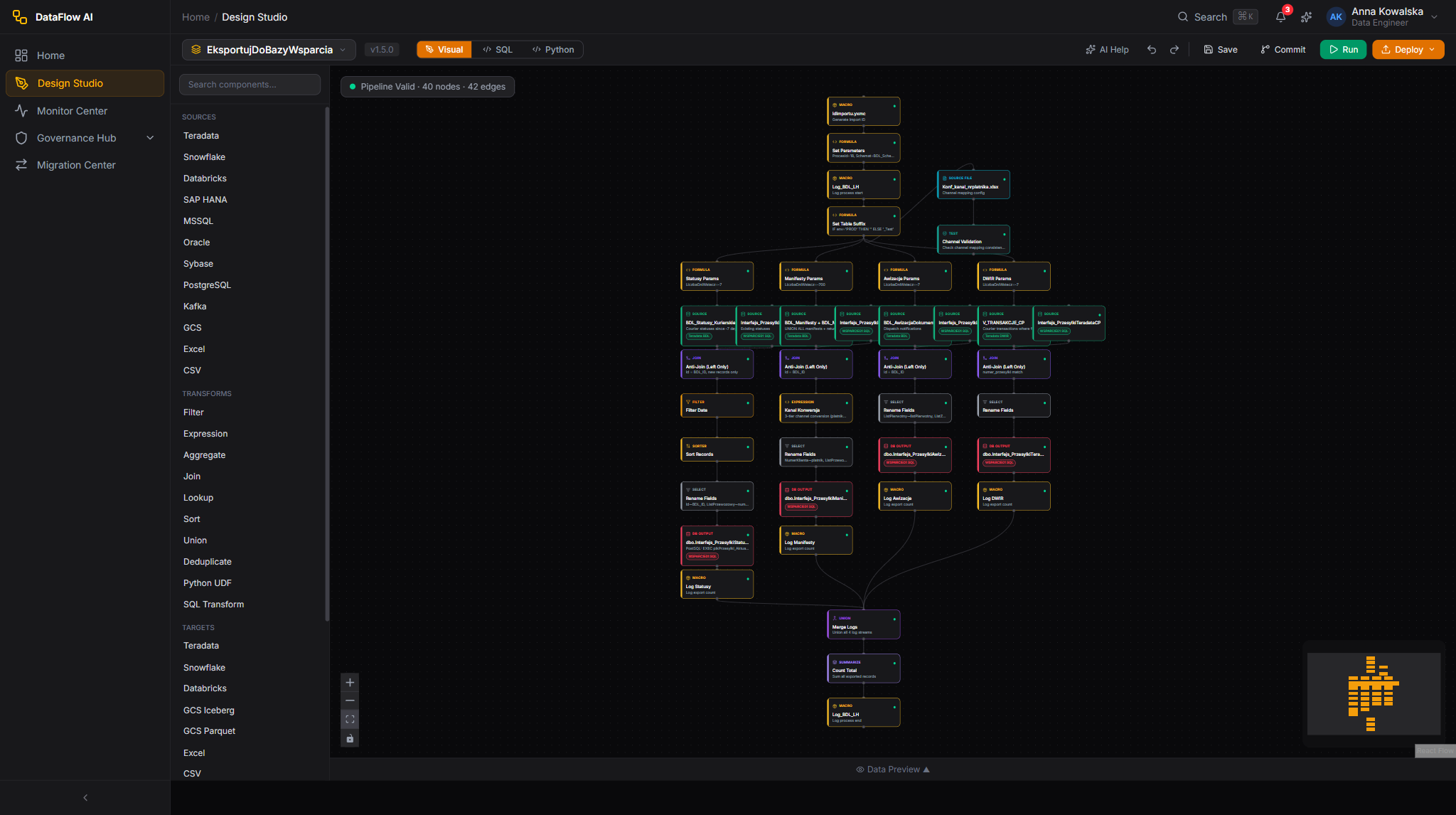
Marek imports the YAML into a DataFlow AI workspace. The pipeline appears in the Design Studio as a visual diagram — boxes and arrows, much like the original Alteryx canvas Joanna knows. There he sets its real schedule (the report used to be run on demand, so the team agrees a daily cron schedule), fills in connections and parameters, and saves. Saving commits the pipeline to Git — so for the first time ever, Joanna's workflow is version-controlled, centrally stored, and runs on its own without anyone opening Alteryx.
Step 9 — Verifying the results with a parallel run
Marek does not simply switch off the old Alteryx workflow. The Polkomtel migration programme requires a parallel run.
For a minimum of two weeks, both versions run against the same input data: Joanna's original .yxmd in Alteryx, and the new DataFlow AI pipeline. DataFlow AI's Parallel Run & Data Parity Validation compares the two outputs across five dimensions:
- Exact row count — same number of rows out?
- Checksum — an MD5/SHA-256 fingerprint of all the data.
- Column sampling — a random 1,000 rows compared column by column.
- Null counts — empty-value counts per column must match.
- Execution time — the new pipeline must finish within 2× the old one's time.
The tool produces a clear pass/fail report. Once EksportujDoBazyWsparcia clears Polkomtel's output-parity threshold for the full window, the team signs off, switches fully to DataFlow AI, and the Alteryx licence for that workflow can eventually be retired. If anything ever looks wrong, rolling back is a single configuration change.
In plain terms
A parallel run is like running the new machine right next to the old one for two weeks and checking, every single day, that they produce identical products. Only when the new machine has earned that trust does the old one get switched off.
The whole journey at a glance
Here is the complete trip for Joanna's Alteryx workflow:
- Locate
EksportujDoBazyWsparcia.yxmd— the.yxmdfile is the workflow. - Upload it to the Migration Center's Import Wizard.
- The Migration Center parses the
.yxmdinto a tool-neutral description. - The Rule Engine converts each tool into a DataFlow node — by precise rule, generic mapping, or AI assistant.
- Every node gets a confidence score; the 0.85 release gate decides
COMPLETEDversusFAILED. - Validation runs six independent safety checks.
- Marek reviews the report and finishes the macros by hand, re-implementing each as a Python UDF or inline SQL.
- He downloads the converted YAML, imports it into a workspace, sets the schedule and connections, and deploys it.
- A two-week parallel run proves the new pipeline matches the old one row-for-row, after which the Alteryx workflow is retired.
Multiply that across Polkomtel's 50–100 Alteryx workflows, and the company turns a scattered collection of laptop-bound .yxmd files into a governed, scheduled, version-controlled set of cloud pipelines — and retires a $200,000-a-year licence along the way.
Frequently asked questions
Why can't macros be migrated automatically? A macro's logic lives inside its own separate .yxmc file. The Migration Center reads the .yxmd workflow, which only references the macro by name — it cannot see inside it. So macros are flagged as manual work; an engineer opens the .yxmc, understands it, and rebuilds the logic natively.
My job said FAILED but the streams converted fine — what happened? FAILED means the release gate tripped — it needs a human. For an Alteryx workflow with macros, the custom_transform placeholder nodes automatically block an unattended release. Finish the macros, and the gate will pass.
Does the data move during a migration? No. Only the instructions move from Alteryx into DataFlow AI. The Excel files, the Teradata and MSSQL databases — all stay exactly where they were.
What happens to Python or R tools in a workflow? Like macros, they are converted to custom_transform placeholders and sent to the AI assistant for a starting skeleton. An engineer then reviews and finishes them — typically as a Python UDF in DataFlow AI.
Will the new pipeline look familiar to the analyst? Yes. In the Design Studio the converted pipeline is shown as a visual canvas of boxes and arrows — the same drag-and-connect idea Joanna used in Alteryx — but now it is scheduled, monitored, governed, and version-controlled.