Users & journeys
Personas & roles
DataFlow AI is designed around four primary personas — the Data Engineer, the Business Analyst, the Platform Admin, and the Data Steward. Every persona is given a named representative in the design docs, and the platform's interface is role-adaptive: layout, widgets, navigation, and content all change to fit the work that persona actually does. This page introduces each persona and then reconciles the three distinct role vocabularies that exist in the codebase.
The four personas
The platform's user experience is built for four people. Each has a named representative, a department, a mock email, and a colored role badge that appears throughout the UI.
| Persona | Named rep | Department | Email (mock) | Avatar color | Role badge |
|---|---|---|---|---|---|
| Data Engineer | Anna Kowalska (AK) | DWH Team | anna.kowalska@polkomtel.com.pl | blue-600 | "Data Engineer" (blue) |
| Business Analyst | Marek Nowicki (MN) | Analytics Team | marek.nowicki@polkomtel.com.pl | emerald-600 | "Business Analyst" (emerald) |
| Platform Admin | Katarzyna Zielińska (KZ) | Platform Engineering | katarzyna.zielinska@polkomtel.com.pl | purple-600 | "Platform Admin" (purple) |
| Data Steward | Tomasz Wiśniewski (TW) | Data Governance | tomasz.wisniewski@polkomtel.com.pl | amber-600 | "Data Steward" (amber) |
The active persona is stored in a persisted Zustand personaStore (localStorage key dataflow-persona) and is read on every render, so panels re-render in place when a persona switches — no re-authentication required.
Roles beyond the four personas
Several roles appear in the supporting documents but are not given a first-class persona dashboard: the Migration Specialist (in practice a Data Engineer working in the Migration Center), the Manager / Workspace Admin (reviews and approves pipeline deployments), the Operator (Execute + Monitor, from the RFI model), and the Viewer (read-only). They reuse the Engineer, Admin, or Steward surfaces.
Data Engineer — Anna Kowalska
Anna builds and maintains 500+ ETL pipelines for the DWH team. She is the platform's power user, working across the Visual canvas, SQL, and Python every day.
Goals
- Reliable data pipelines that run on schedule without surprises.
- Fast debugging when something fails overnight.
- Clean, Git-versioned code that survives code review.
Pain points (current state)
- Informatica PowerCenter is slow to develop in.
- No Git integration in the legacy tooling.
- Fragmented tools spread her work across many disconnected applications.
Responsibilities
- Pipeline design across all three modes — Visual, SQL, and Python.
- Connection management for Teradata, Snowflake, Databricks, SAP HANA, MSSQL, and more.
- Scheduling pipelines with cron expressions.
- Debugging failures and applying AI-suggested fixes.
- Code review and environment promotion (Dev → Staging → Prod).
- Legacy migration through the Migration Center.
Adaptive dashboard
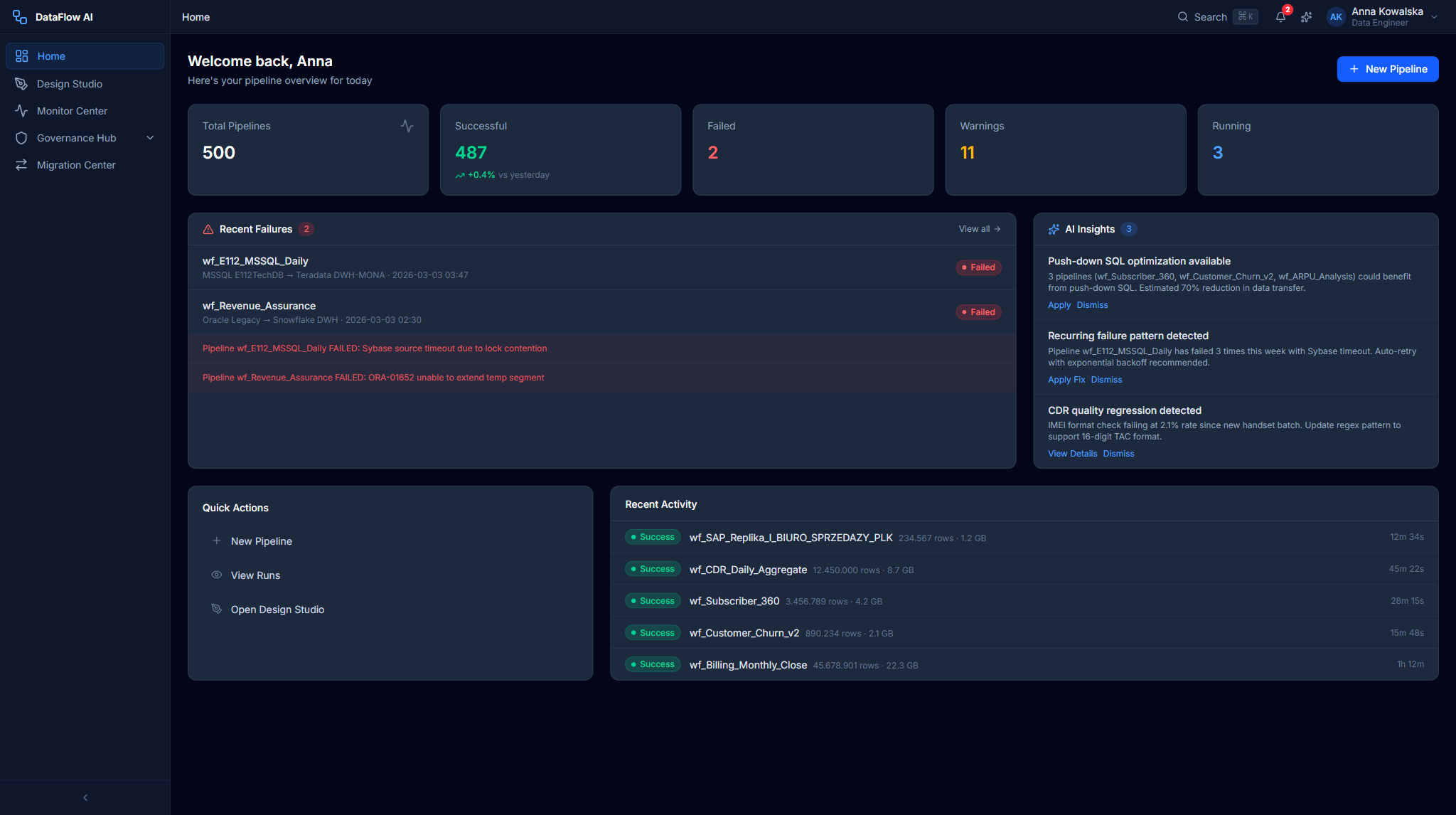
Anna's Home Dashboard uses a grid-cols-3 layout with a blue gradient greeting banner. It surfaces a PipelineStatusCard (e.g. "487/500 healthy" with a segmented green/red/yellow bar), a RecentFailuresCard of clickable failure items, an AIInsightsCard with a blue left-border and lightbulb insights, a QuickActionsBar (New Pipeline / View Runs / Design Studio / AI Chat), and a RecentActivityFeed plus a 7-day PipelineHealthTrend chart.
Key metrics
| Metric | Target |
|---|---|
| Time to first pipeline run | < 2 hours |
| Time to first production pipeline | < 5 days |
| Onboarding satisfaction | > 4.5 / 5 |
Business Analyst — Marek Nowicki
Marek creates ad-hoc data extracts and reports. He is not a coder, and the platform is built to keep it that way.
Goals
- Self-service data access with no coding required.
Pain points (current state)
- The Alteryx license is expensive.
- Limited collaboration with the rest of the analytics team.
Responsibilities
- Building extracts via AI chat or the visual designer.
- Scheduling report pipelines.
- Monitoring data freshness.
- Exploring the data catalog through the Data Browser.
Adaptive dashboard
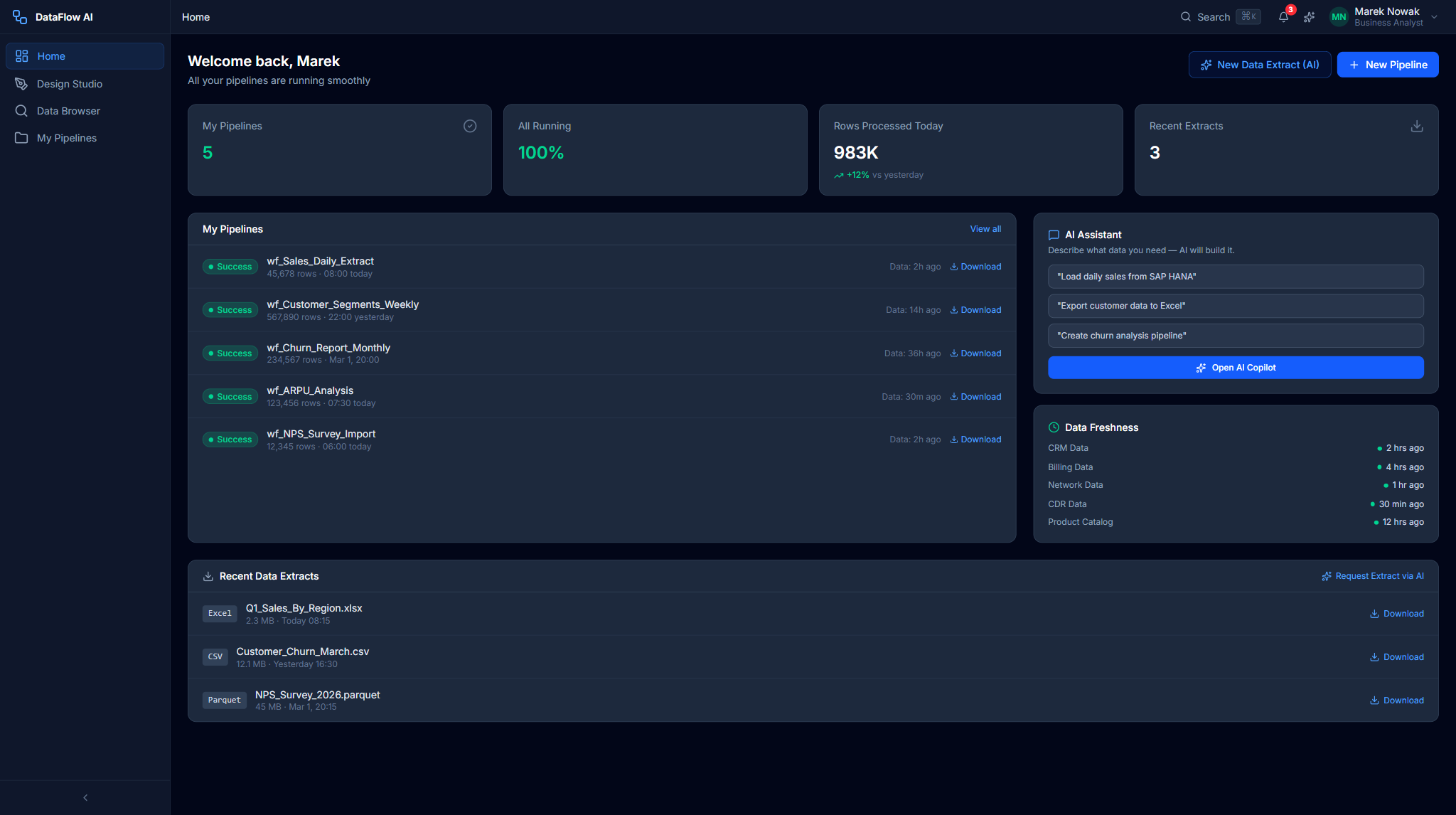
Marek's Home Dashboard uses a grid-cols-2 layout with an emerald gradient banner. It shows a MyPipelinesCard ("5/5" badge, last/next-run rows), an AIChatQuickEntry (a free-text input plus quick-prompt pills that open the AI Copilot), a DataFreshnessCard with per-source freshness bars, a RecentExtractsCard of Excel/CSV/Parquet downloads, and a ScheduledPipelinesTable.
Key metric
| Metric | Target |
|---|---|
| Time to first pipeline | < 30 minutes |
Platform Admin — Katarzyna Zielińska
Katarzyna manages the infrastructure, security, and users that keep DataFlow AI running.
Goals
- A stable platform with predictable uptime.
- Easy scaling during peak load (month-end).
- Cost control against a monthly budget.
Pain points (current state)
- Manual server management.
- No cloud elasticity.
Responsibilities
- Infrastructure provisioning (Terraform, GKE Autopilot, Cloud SQL).
- Keycloak and Active Directory federation.
- RBAC role mapping (AD groups → platform roles).
- Connector registration and connectivity testing.
- Monitoring and alerting setup (Grafana, PagerDuty).
- User and workspace management.
- Cost tracking, incident response, and scaling.
Adaptive dashboard
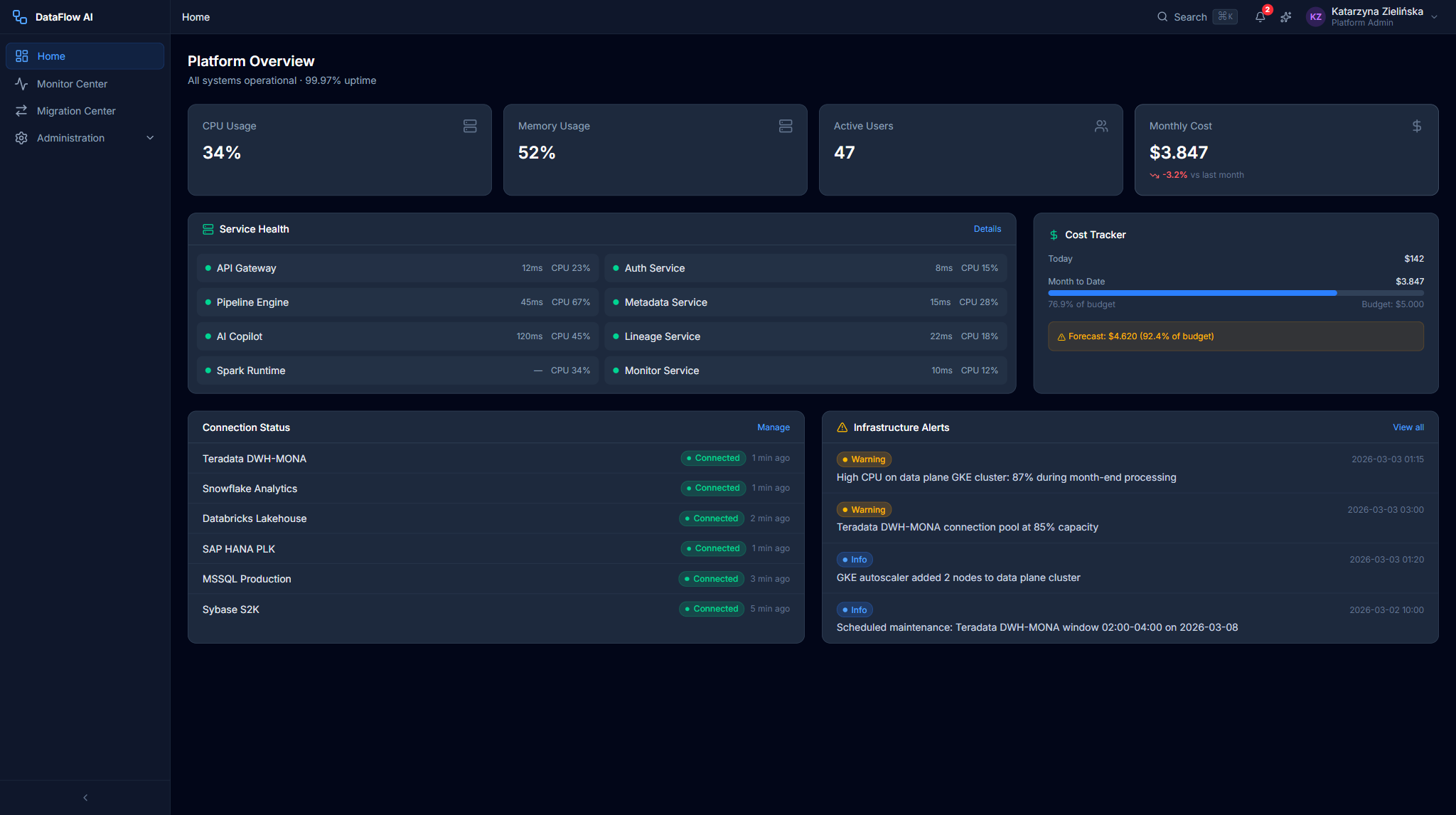
Katarzyna's Home Dashboard uses a grid-cols-3 layout with a purple gradient banner. It surfaces a SystemHealthCard (CPU/Mem/Disk/Network bars and uptime), a CostTrackerCard (today/month/budget with a forecast), an ActiveUsersCard (count plus per-role bars), an InfrastructureAlertsCard with acknowledge buttons, a ScalingEventsCard, and a ServiceStatusTable.
Data Steward — Tomasz Wiśniewski
Tomasz ensures data quality and governance across Polkomtel's data estate.
Goals
- Complete, trustworthy data lineage.
- Continuous quality monitoring.
- Demonstrable regulatory compliance.
Pain points (current state)
- Fragmented lineage spread across Informatica, Teradata, and BI tools.
Responsibilities
- Lineage investigation across the full data estate.
- Governance review and approval of pipelines before deployment.
- Quality-rule management and monitoring.
- Business glossary maintenance.
- Audit-trail review and compliance reporting (GDPR data maps, PII inventory, access audits).
Adaptive dashboard
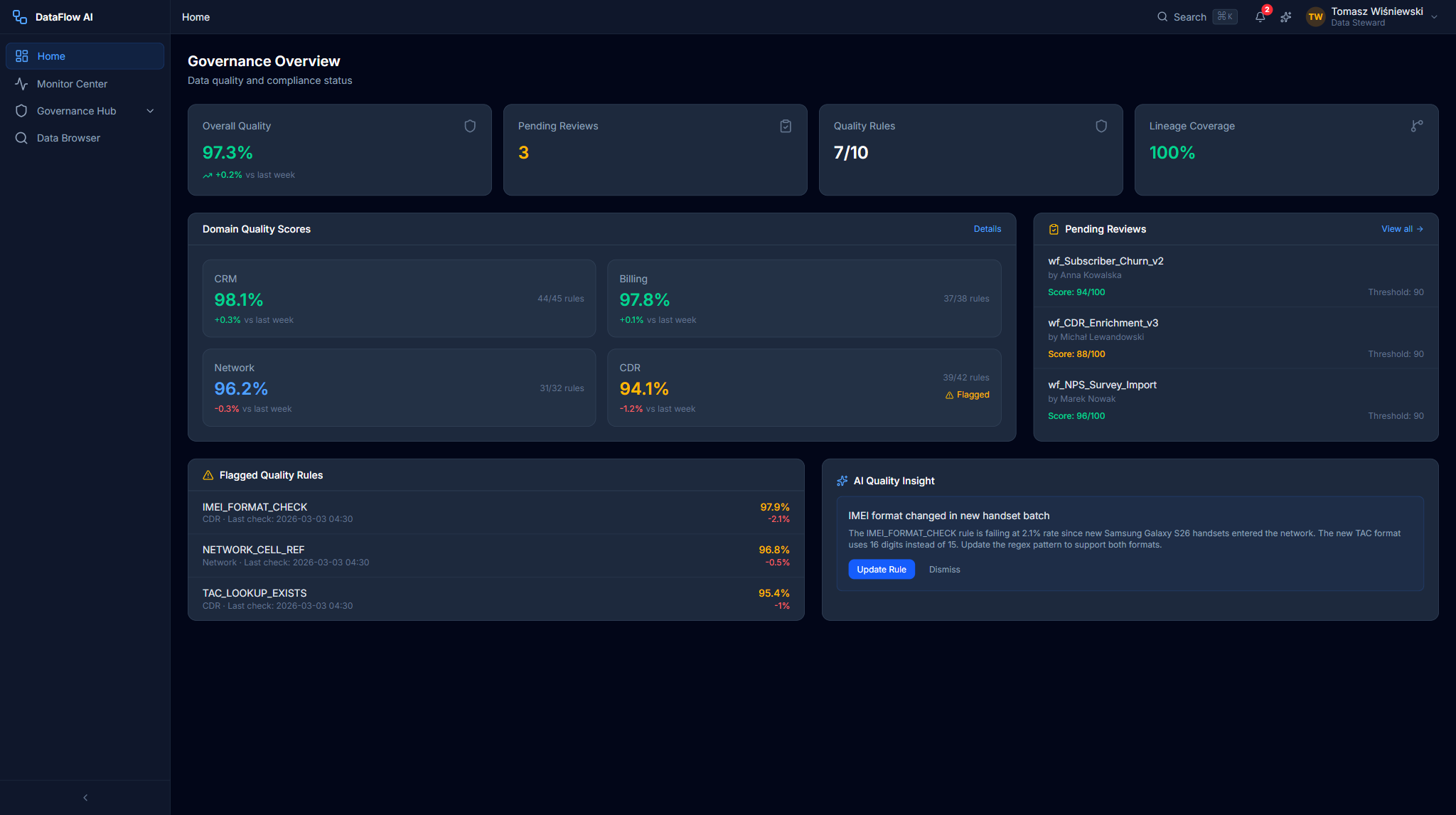
Tomasz's Home Dashboard uses an amber gradient banner and surfaces the governance review queue, quality scores, and lineage entry points. A GovernanceQueueCard lists pipelines awaiting certification, a QualityScoreCard shows the overall data-quality percentage with a week-over-week delta, and direct links open the Lineage Explorer and Audit Trail.
The three role taxonomies
The codebase contains three overlapping role vocabularies that do not fully align. This is a known source of confusion, so it is worth stating plainly.
1. UX personas (4)
The product and UX layer uses four personas: engineer, analyst, admin, steward. These drive the role-adaptive interface and the front-end route guards.
2. Keycloak realm roles (5–6)
The Keycloak realm dataflow ships six realm roles: org_admin, workspace_admin, developer, analyst, operator, viewer. org_admin is a composite role that includes the other five. Note there is no steward and no engineer realm role — developer stands in for the engineer.
The admin guide also describes a five-role view keyed to AD groups:
| Keycloak role | AD group | DataFlow access |
|---|---|---|
ADMIN | DL-DataFlow-Admins | Full system access, user management |
MANAGER | DL-DataFlow-Managers | Workspace management, approve pipelines, view all dashboards |
ENGINEER | DL-DataFlow-Engineers | Create/edit/run pipelines, manage connections |
VIEWER | DL-DataFlow-Viewers | Read-only dashboards, pipeline status, lineage |
STEWARD | DL-DataFlow-Stewards | Data governance, quality rules, catalog tags |
3. RFI RBAC roles (6 + OPA)
The RFI response describes a finer-grained model with six built-in roles plus Open Policy Agent for attribute-based access control:
| Role | Pipelines | Connections | Environments | Admin |
|---|---|---|---|---|
| Org Admin | Full | Full | All | Full |
| Workspace Admin | Full (in workspace) | Full (in workspace) | All (in workspace) | Workspace |
| Developer | RWX Dev; R Staging/Prod | R Dev; none Prod | Dev, Staging | None |
| Analyst | RX Dev; R Staging/Prod | R Dev | Dev, Staging | None |
| Operator | X (Execute) + Monitor | R | All | Monitor |
| Viewer | R | None | All (Read) | None |
The backend itself uses a hierarchical DataFlowRole model — ADMIN(100) > ENGINEER(75) > ANALYST(50) > STEWARD(40) > VIEWER(25) — where a role grants any permission whose required level is at or below its own.
Steward hierarchy inversion
In the backend RBACService, STEWARD sits at level 40 — below ANALYST at 50. A steward therefore inherits only VIEWER-level hierarchical permissions; all steward-specific authority comes from explicit @PreAuthorize lists on individual controllers. The front-end persona model, by contrast, gives steward rich governance, quality, and catalog permissions. The two models genuinely disagree on how powerful a steward is.
How the taxonomies map
The three vocabularies are reconciled by hard-coded mapping tables in RBACService, KeycloakJwtConverter, and the front-end keycloak.ts.
| UX persona | Backend DataFlowRole | Keycloak realm role | RFI role |
|---|---|---|---|
| Data Engineer | ENGINEER | developer | Developer |
| Business Analyst | ANALYST | analyst | Analyst |
| Platform Admin | ADMIN | org_admin | Org Admin |
| Data Steward | STEWARD | (no realm role) | — |
There is no persona for MANAGER, Operator, or Viewer. The MANAGER role surfaces only in the governance review-and-approval workflow.
Role-name resolution at the gateway
The API Gateway maps every raw role string — realm roles, client roles, group names, group paths — to a single DataFlowRole, with the highest level winning. A few examples:
| Raw role / group | → DataFlowRole |
|---|---|
PLK-BI-Admins, org_admin, workspace_admin, platform_admin | ADMIN |
PLK-BI-Engineers, developer, operator, data_engineer | ENGINEER |
PLK-BI-Analysts, analyst, business_analyst | ANALYST |
PLK-BI-Stewards, steward, data_steward | STEWARD |
PLK-BI-Viewers, viewer | VIEWER |
| Unrecognized role | skipped — no implicit grant |
If a JWT has no mappable roles, the authority set is empty and the request is rejected — a deliberate anti-privilege-escalation choice. AD-group membership syncs automatically with propagation of five minutes or less.
Steward in Keycloak
Because there is no steward realm role in the shipped export, the seeded "Tomasz Zielinski / Data Steward" user actually carries the realm role viewer. A real steward would be granted authority through an AD group such as PLK-BI-Stewards (which KeycloakJwtConverter knows how to map), not a realm role.
Workspace and environment scoping
RBAC nests inside a hierarchy:
Organization
  └─ Workspace
       └─ Environment (Dev / Staging / Prod)
            └─ Resources (Pipelines, Connections, Datasets)
                 └─ Permissions (R / W / X / Admin)
Each workspace is an isolated environment with its own pipeline definitions, connections, quality rules, governance policies, and lineage graphs. A user may belong to multiple workspaces and switches between them with the workspace selector in the top bar.
Persona → navigation visibility
The sidebar is role-adaptive: items a persona cannot use are completely hidden, not greyed out.
| Nav item | Route | Engineer | Analyst | Admin | Steward |
|---|---|---|---|---|---|
| Dashboard | /dashboard | ✓ | ✓ | ✓ | ✓ |
| Design Studio | /design-studio | ✓ | ✓ | — | — |
| Monitor Center | /monitor | ✓ | ✓ | ✓ | — |
| Governance Hub | /governance | — | — | — | ✓ |
| Data Browser | /data-browser | ✓ | ✓ | — | ✓ |
| Migration Center | /migration | ✓ | — | ✓ | — |
| Administration | /admin | — | — | ✓ | — |
| AI Copilot | /ai-copilot | ✓ | ✓ | — | ✓ |
| Lineage Explorer | /governance/lineage | ✓ | — | — | ✓ |
| Audit Trail | /governance/audit | — | — | ✓ | ✓ |
Navigation filtering alone proved insufficient — a later remediation added a ProtectedRoute guard, a permissions.ts route-RBAC module, and an AccessDenied page so URLs cannot be reached simply by typing them. Front-end RBAC is UX only; real enforcement happens server-side at the gateway and in each service.
Where to go next
- User journeys — an index of the major end-to-end journeys with ASCII maps.
- Data Engineer guide — onboarding, daily workflow, building and debugging pipelines.
- Analyst & Steward guide — self-service extracts, catalog exploration, and governance.
- Administrator guide — platform setup, daily ops, and legacy migration.