Feature guides
Connectors & Pipeline Templates
Two galleries accelerate pipeline creation on the DataFlow AI Platform. The Connector Marketplace is where you browse and install the data connectors that link pipelines to Polkomtel's source and target systems — 21 connectors spanning databases, files, cloud warehouses, streaming, SaaS, CDC, and telecom CDR formats. The Pipeline Templates gallery is where you start a new pipeline from a pre-built, curated blueprint instead of from a blank canvas.
The Connector Marketplace
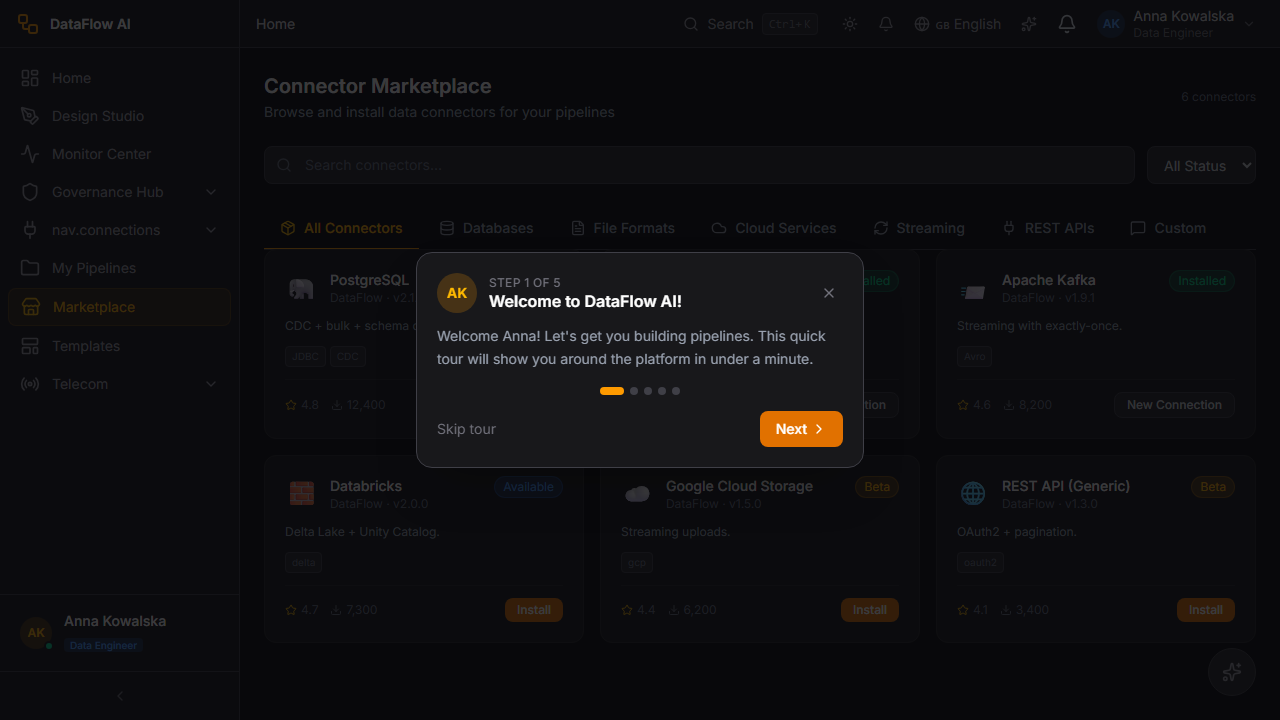
The Connector Marketplace lets you browse, search, and install data connectors for your pipelines. It is live-wired: the page calls GET /api/v1/connectors/marketplace, which returns the connector list from the metadata-service ConnectorMarketplaceController reading the seeded connector_catalog table. There is no client-side fallback data.
Route: /marketplace. Entry file: src/pages/ConnectorMarketplace.tsx. Who uses it: Data Engineers and Platform Admins.
Screen layout
+----------------------------------------------------------------------+
|  CONNECTOR MARKETPLACE                          21 connectors        |
|                                                                      |
|  [ Search connectors... ]            Status: [ All v ]               |
|                                                                      |
|  [ All ][ Databases ][ File Formats ][ Cloud Services ]              |
|  [ Streaming ][ REST APIs ][ Custom ]                                |
|                                                                      |
|  +----------------+ +----------------+ +----------------+            |
|  | [icon] Teradata| | [icon] Snowfl. | | [icon] Kafka   |            |
|  | Vendor · v1.x  | | Vendor · v1.x  | | Vendor · v1.x  |            |
|  | [Available]    | | [Installed]    | | [Available]    |            |
|  | Description... | | Description... | | Description... |            |
|  | [tag][tag]     | | [tag][tag]     | | [tag][tag]     |            |
|  | * 4.6  1.2k dl | | * 4.8  3.4k dl | | * 4.5  890 dl  |            |
|  | [ Install ]    | | [New Connection]| | [ Install ]   |            |
|  +----------------+ +----------------+ +----------------+            |
+----------------------------------------------------------------------+
UI controls
| Control | Behaviour |
|---|---|
| Connector count | Header shows the live count returned by the API |
| Search input | Filters the card grid by connector name |
| Status filter | All / Available / Installed / Beta |
| Category tabs | All, Databases, File Formats, Cloud Services, Streaming, REST APIs, Custom |
| Connector card | Emoji icon, name, vendor + version, status badge, description, tag pills, star rating, download count |
| Install button | Installs an available connector |
| New Connection button | Shown on installed cards; opens the connection wizard |
The page renders explicit loading, error-with-retry, and empty states (test IDs connectors-loading, connectors-error, connectors-empty, connectors-grid, connector-card).
Why a plain fetch
The Marketplace deliberately uses a plain fetch('/api/v1/connectors/marketplace') rather than React Query and the shared Axios interceptor. An auth-hydration re-render race previously left the page stuck on its spinner; a fire-and-forget fetch sidesteps the request cancellation. credentials:'include' is intentionally omitted to avoid a Chromium body-stream stall.
The 21 connectors
The connector framework lives in the connector-sdk library module, which defines the connector contract (ConnectorSDK.kt) and ships 21 connector implementations. Connectors are discovered at runtime through a ConnectorRegistry backed by Java's ServiceLoader. Capabilities a connector can declare include schema discovery, read, write, column projection, predicate push-down, schema evolution, streaming, partitioning, compression, cloud storage, and batch write.
| Category | Connectors |
|---|---|
| Databases (JDBC) | PostgreSQL, MySQL, MSSQL, Oracle, Sybase, Teradata, SAP HANA |
| Cloud warehouses | BigQuery, Databricks, Snowflake |
| File formats | CSV, JSON, XML, Excel, Parquet |
| Streaming & messaging | Kafka, Pub/Sub, Event Hubs |
| SaaS / ERP | Salesforce, ServiceNow, SAP, REST API |
In addition, the SDK provides cross-cutting CDC (change-data-capture) support via Debezium for MySQL binlog, MSSQL change tracking, and MongoDB change streams, plus a MongoDB NoSQL connector.
Telecom CDR connector
A dedicated CDR connector (cdr/) handles Polkomtel's telecom call detail records. It includes an ASN.1 decoder, a binary CDR decoder, a Parquet converter, a watermark policy, and connector metrics. It ships three roaming-record templates, validated by a RoamingTemplateValidator:
| Template | Telecom format |
|---|---|
Tap3Template | TAP3 — Transferred Account Procedure, the standard for billing roaming usage between operators |
RapTemplate | RAP — Returned Account Procedure, used to return rejected TAP records |
NrtrdeTemplate | NRTRDE — Near Real Time Roaming Data Exchange, for fast fraud detection on roaming usage |
Telecom-native
TAP3, RAP, and NRTRDE are not generic file formats — they are the specific binary roaming-record formats used by mobile operators. The CDR connector decodes them directly with ASN.1, so Polkomtel can ingest roaming usage and run fraud checks without a separate decoding stage.
Connector catalog
For the full per-connector reference — every configuration parameter, authentication method, capability, and a YAML example for all 21 connectors — see the dedicated Connector catalog page. It groups the connectors by category:
| Category | Connectors |
|---|---|
| Relational databases (JDBC) | PostgreSQL, MySQL, Oracle, MSSQL, Teradata, SAP HANA, Sybase |
| NoSQL database | MongoDB |
| Cloud data warehouses | Snowflake, Databricks, BigQuery |
| Streaming | Kafka, CDC (Debezium) |
| File formats | CSV, Excel, JSON, Parquet, XML |
| SaaS / ERP | Salesforce, SAP ERP, ServiceNow, REST API |
| Telecom CDR | CDR (ASN.1) — with TAP3, NRTRDE, and RAP roaming formats |
The catalog also includes a deep section on the cdr-asn1 connector, covering the ASN.1 decoding pipeline and the three GSMA roaming-settlement formats.
The Pipeline Templates gallery
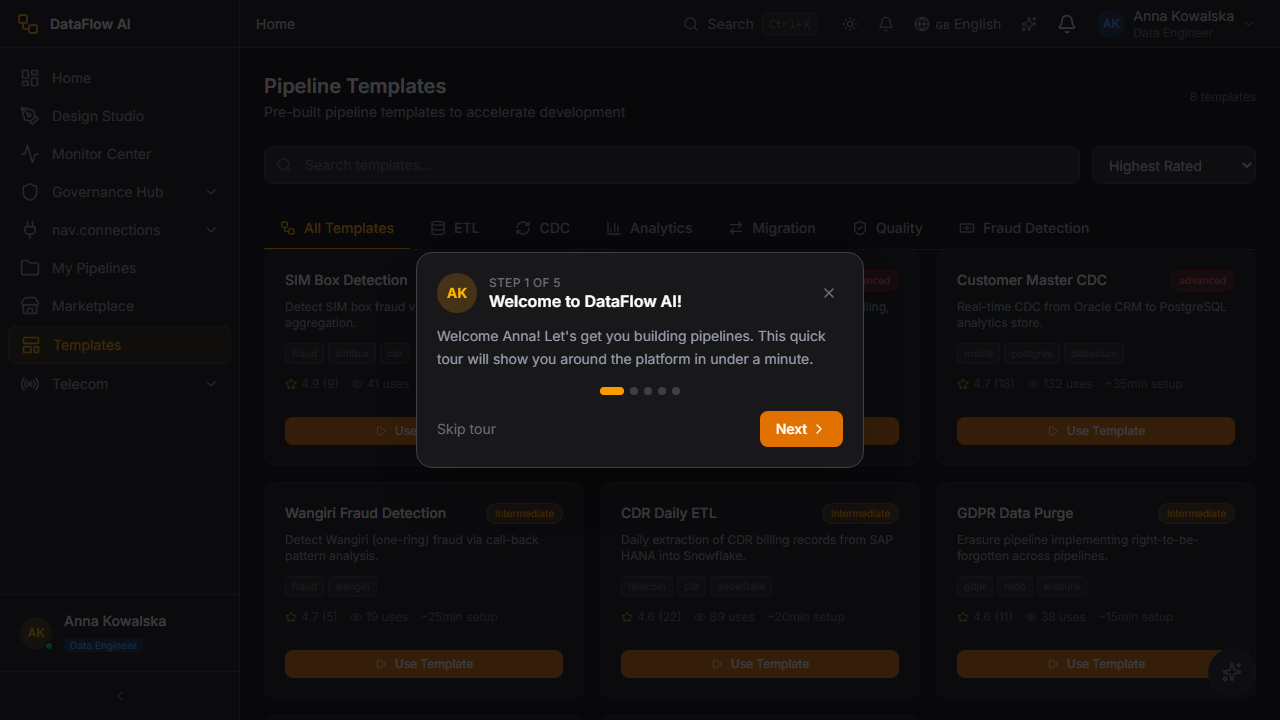
The Pipeline Templates gallery lets you browse, search, and instantiate pre-built pipeline templates instead of building from scratch. It is live-wired: the page calls GET /api/v1/templates/catalog, which returns templates from the metadata-service PipelineTemplateController (mapping pipeline_templates rows, including complexity, usage count, and estimated setup minutes). There is no fallback data.
Route: /templates. Entry file: src/pages/PipelineTemplates.tsx. Who uses it: all pipeline builders.
Screen layout
+----------------------------------------------------------------------+
|  PIPELINE TEMPLATES                             N templates          |
|                                                                      |
|  [ Search templates... ]          Sort: [ Most Used v ]              |
|                                                                      |
|  [ All ][ ETL ][ CDC ][ Analytics ][ Migration ]                     |
|  [ Quality ][ Fraud Detection ]                                      |
|                                                                      |
|  +--------------------------+ +--------------------------+           |
|  | Telecom Subscriber-360   | | SAP HANA Replication     |           |
|  | [advanced]               | | [intermediate]           |           |
|  | Description...           | | Description...           |           |
|  | [tag][tag]               | | [tag][tag]               |           |
|  | * 4.7 (24)   Used 312x   | | * 4.5 (18)   Used 140x   |           |
|  | ~45 min setup            | | ~20 min setup            |           |
|  | [ Use Template ]         | | [ Use Template ]         |           |
|  +--------------------------+ +--------------------------+           |
+----------------------------------------------------------------------+
UI controls
| Control | Behaviour |
|---|---|
| Template count | Header shows the count returned by the API |
| Search input | Filters the card grid by template name |
| Sort dropdown | Highest Rated / Most Used / Recently Updated |
| Category tabs | All, ETL, CDC, Analytics, Migration, Quality, Fraud Detection |
| Template card | Name, complexity badge, description, tag pills, star rating + count, usage count, estimated setup minutes |
| Use Template button | Instantiates the template into the Design Studio |
Each card carries a complexity badge — beginner (emerald), intermediate (amber), or advanced (red) — so you can pick a template matched to your experience level.
The Telecom Subscriber-360 template
The gallery's flagship telecom blueprint is the Subscriber-360 template — a P0 (priority-zero) telecom template that assembles a unified, 360-degree view of a Polkomtel subscriber. It has its own dedicated landing page at /telecom/subscriber-360 (entry Subscriber360TemplatePage), in addition to appearing as a card in the gallery.
Subscriber-360 brings together the data domains that describe a subscriber — CRM, billing, network, and CDR — into a single consolidated dataset, the kind of foundation used downstream for churn modelling, ARPU analysis, and retention campaigns. Because it spans multiple sources and joins, it carries an advanced complexity badge.
How to use it — click-paths
Add a connector
- Open the Connector Marketplace at
/marketplace. - Narrow the grid — pick a category tab (e.g. Databases) or type into the search input.
- Optionally set the Status filter to Available to hide already-installed connectors.
- On the connector you want, click Install.
- Once installed, the card shows a New Connection button — click it to open the connection wizard at
/connections/new?connector={id}. - Complete the wizard to register a usable connection for your pipelines.
Behind the scenes: a plain fetch('/api/v1/connectors/marketplace') populates the grid; the connection wizard (ConnectionWizard, api/connections.ts) registers the new connection.
Start from a template
- Open the Pipeline Templates gallery at
/templates. - Choose a category tab (e.g. ETL, CDC, or Fraud Detection) or search by name.
- Sort the grid with the Sort dropdown — switch to Most Used to surface battle-tested templates.
- Check each card's complexity badge and estimated setup minutes.
- Click Use Template on the template you want.
- You are navigated to
/design-studio?template={templateId}, where the Design Studio opens pre-populated with the template's nodes and configuration. - Adjust the pre-built pipeline as needed, validate, and deploy.
For the Subscriber-360 template specifically, you can also open its dedicated page at /telecom/subscriber-360 and start from there.
Behind the scenes: a plain fetch('/api/v1/templates/catalog') populates the gallery; selecting a template hands the templateId to the Design Studio, which loads the template definition into the canvas.
Templates are starting points
Instantiating a template gives you an editable copy in the Design Studio — it is not a locked, managed object. Review and adjust connections, schemas, and quality checks before deploying to staging or production.
Behind the scenes — API summary
| Capability | API / source |
|---|---|
| Connector marketplace list | GET /api/v1/connectors/marketplace → ConnectorMarketplaceController → connector_catalog table |
| Template catalog list | GET /api/v1/templates/catalog → PipelineTemplateController → pipeline_templates table |
| Connection registration | ConnectionWizard + api/connections.ts |
| Connector framework | connector-sdk library — ConnectorSDK.kt, ConnectorRegistry.kt, 21 impl/ connectors |
| Typed template module | api/pipelineTemplates.ts |
Connector UI components live in src/components/connections/ (ConnectorTypeCard, ConnectionWizard, DatabaseIcons). Both galleries deliberately bypass React Query in favor of a fire-and-forget fetch to avoid an auth-hydration cancellation race.